How to use the API
Authorisation of endpoints
The endpoints of the API are secured by OAuth 2.0 and may only be called with a valid bearer token. The token can be retrieved via a code flow. Afterwards the token must be provided in the http authorization header.
Further reading: OAuth 2.0.
curl --location --request GET '/trading/v1/orders' \ --header 'Accept: application/hal+json;charset=UTF-8' \ --header 'Authorization: Bearer eyHa...KTR' |
Authentication of transactions
Some requests require the customer to verify their identity. These requests submit, change or cancel orders and expect authentication data in the body. The attribute code can be one of tan, session or secureMessage, which can be seen for your user account by calling Select AuthenticationData API.
tan
Provide type=tan. Additionally provide code= which is generated by the customer's tan generator.
curl -X POST "/trading/v1/order-entries/{no}/place" \ -H "Content-Type: application/json" \ -d '{"type": "tan", "code": "xxx" }' |
Provide type=session. Enable or disable a session via POST /session-tan
Further reading: Enable SessionTan.
curl -X POST "/trading/v1/order-entries/{no}/place" \ -H "Content-Type: application/json" \ -d '{"type": "session" }' |
secureMessage
Provide type=secureMessage. Authorize the transaction via device. This authentication method is currently not allowed for Enable SessionTan
curl -X POST "/trading/v1/order-entries/{no}/place" \ -H "Content-Type: application/json" \ -d '{"type": "secureMessage" }' |
AuthenticationData
Contains possible methods of authentication of the securities account owner, see Select AuthenticationData.
Collections
Collections are wrapped inside an json object which contains an attribute called items.
curl -X GET "/trading/v1/securities-accounts/{no}/positions" \ -H "Content-Type: application/json" |
Response{ "items": [...] // list of positions } |
Filter
Endpoints may support parameters that filter the collection based on attributes, see swagger file
curl -X GET "/trading/v1/orders/{no}?wkn=A1EWWW" \ -H "Content-Type: application/json" |
Response{ "items": [...] // items with WKN: A1EWWW } |
The orderStatus filter allows only for the following values:
- OPEN - filters by all orders with orderStatus="ORDER_STATUS_OPEN"
- EXECUTED - filters by all orders with orderStatus="ORDER_STATUS_EXECUTED"
- ALL - gets all orders
curl -X GET "/trading/v1/orders/{no}?orderStatus=OPEN" \ -H "Content-Type: application/json" |
|
Pagination
Endpoints may support pagination for GET operations on collection endpoints. If supported the endpoint must accept perPage and page parameters where the perPage is the maximum number of items to be returned, and page is the 1-based index within the result set of the first resource to be returned. Note that page numbering is 1-based and that omitting the page parameter will return the first page.
Supported query parameters for securities-accounts
- perPage - set the page size
- page - set the current page
curl -X GET "/trading/v1/securities-accounts/{no}/positions?perPage=25&page=5" \ -H "Content-Type: application/json" |
|
Supported query parameters for orders
- maxRecords - Set maximum number of order records starting from most recently created one
curl -X GET "/trading/v1/orders?maxRecords=5" \ -H "Content-Type: application/json" |
|
Sorting
Endpoints may support ascending and descending sorting. If supported the endpoint must accept sort.
- Plus ("+") to request an ascending sort order
- Minus ("-") to request a descending sort order
curl -X GET "/trading/v1/securities-accounts/{no}/positions?sort=+price" \ -H "Content-Type: application/json" |
Status Codes
Endpoints may return the following status codes:
- 200 - request successful, returns resource
- 201 - request successful, returns link to new resource
- 202 - request successful, returns link to status resource
- 400 - request failed, user input invalid
- 401 - request failed, invalid bearer token
- 404 - request failed, resource does not exist
- 409 - request failed, resource cannot not be created more than once
- 500 - request failed, internal error
Errors
Every request that fails contains an error object in its body providing detailed information.
|
Business Objects
The Trading API provides access to the following business objects:
ExAnteCost
Shows the costs that will incur when the corresponding order is executed at a trading venue. The id can be retrieved from the corresponding order entry.
Order
Represents an order that has already been submitted to an external trading venue. The order may be changed or cancelled by the client before it is processed by a trading venue.
OrderEntry
Represents an initial order that is managed by the Trading API. It has not been submitted to an external trading venue yet. It may be updated or placed at a trading venue. The creation or update of an order entry will result in a new ex ante cost resource that informs about the costs of that order. If placed, the order entry is submitted to the trading venue and an order transaction state is returned. If not placed, it will be discarded automatically after 30 minutes.
OrderChange
Represents an order change of an existing order that is managed by the Trading API. It has not been submitted to an external trading venue yet. It may be updated or placed at a trading venue. The creation or update of an order change will result in a new ex ante cost resource that informs about the costs of that order. If placed, the order change is submitted to the trading venue and an order transaction state is returned. If not placed, it will be discarded automatically after 30 minutes.
OrderTransactionState
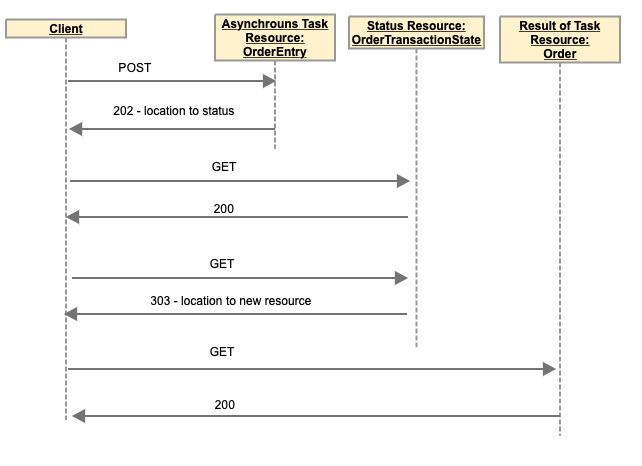
Shows the current state of a transaction that has been placed/accepted. The operation executes synchronously or asynchronously depending on the authorization method. Hence polling of the state is necessary.
In case it is in progress it returns 200. Once the result is ready, the resource is updated and redirects the client to the order resource with a https status code of 303.
QuoteOrderEntry
Represents an initial order that asks for a quote offer from a trading venue. It is managed by the Trading API. It has not been submitted to an external trading venue yet. The creation or update of a quote order entry will result in a new quote from a particular trading venue and a new ex ante cost resource that informs about the costs of that order. If accepted, the quote order entry is submitted to the trading venue and an order transaction state is returned. If not accepted, it will be discarded automatically after 30 minutes.
SecuritiesAccount
Represents the account data. It contains owner, performance, positions and history. Synonymous with depot and portfolio.
Account
Contains owner.
Performance
Shows the performance of a securities account.
Position
Represents an actual position of a securities account.
PositionsHistory
Shows the historical data of a securities account. Synonymous with transactions or trades.
TradingVenue
Represents an external trading venue to which orders are submitted for execution.
Profile
Represents the profile of the user. It contains user authentication data, session tan generation and deletion, session level elevation for executing savings plans and profile transaction data.
Order flows
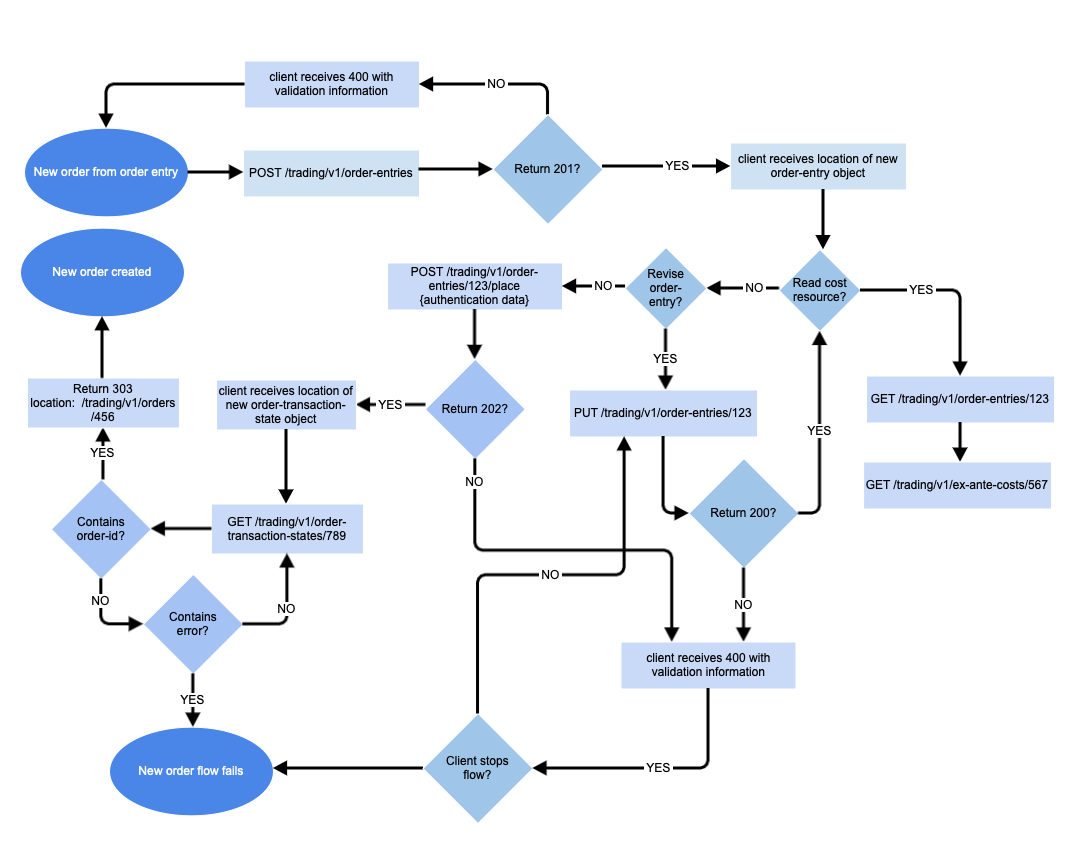
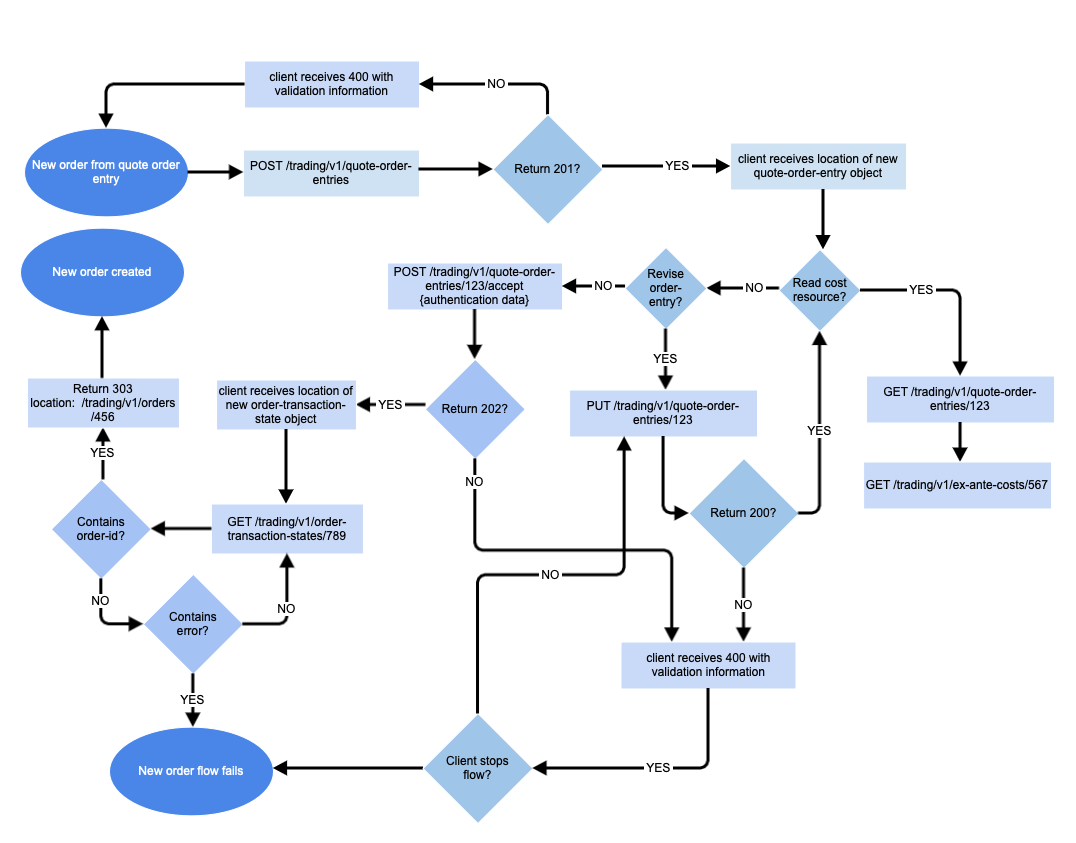
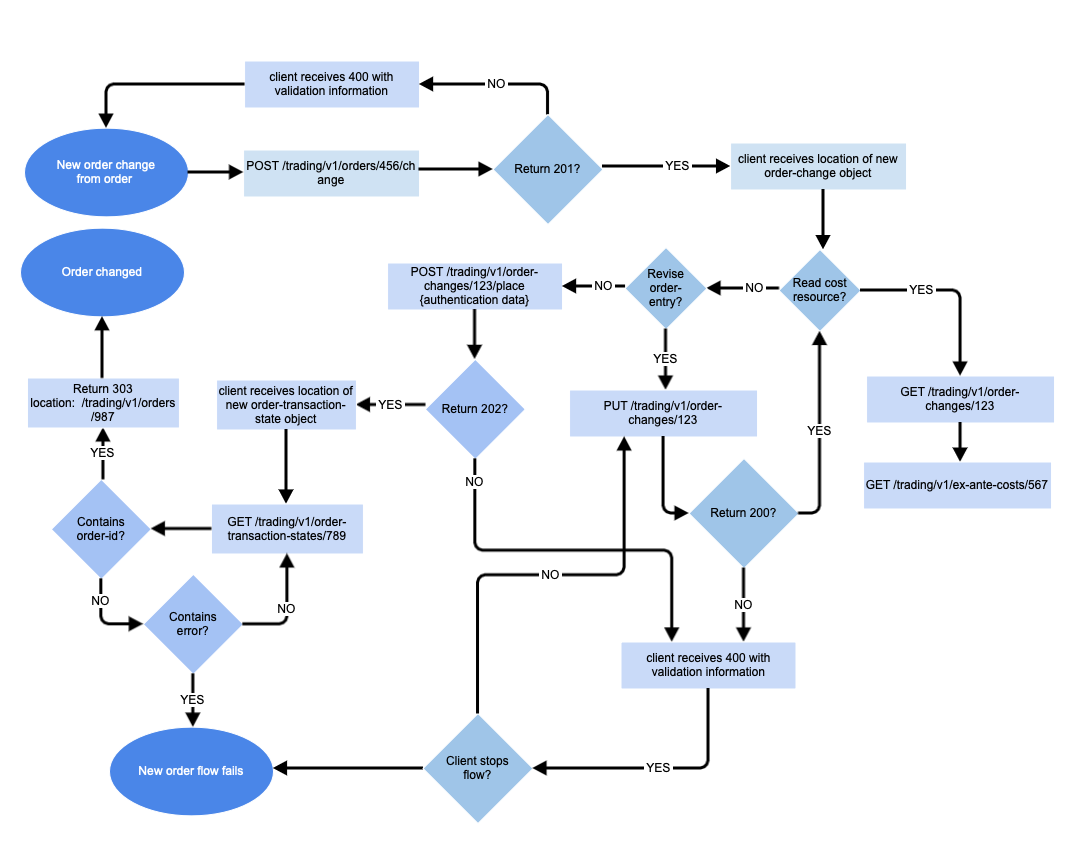
The flow charts show general use cases:
- Place an order at a trading venue
- Accept a quote at a trading venue
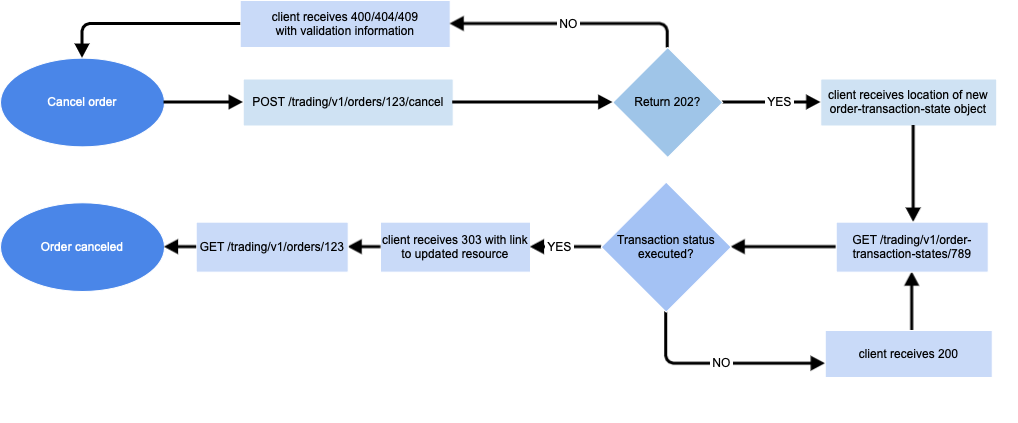
- Cancel an open order
- Change an open order
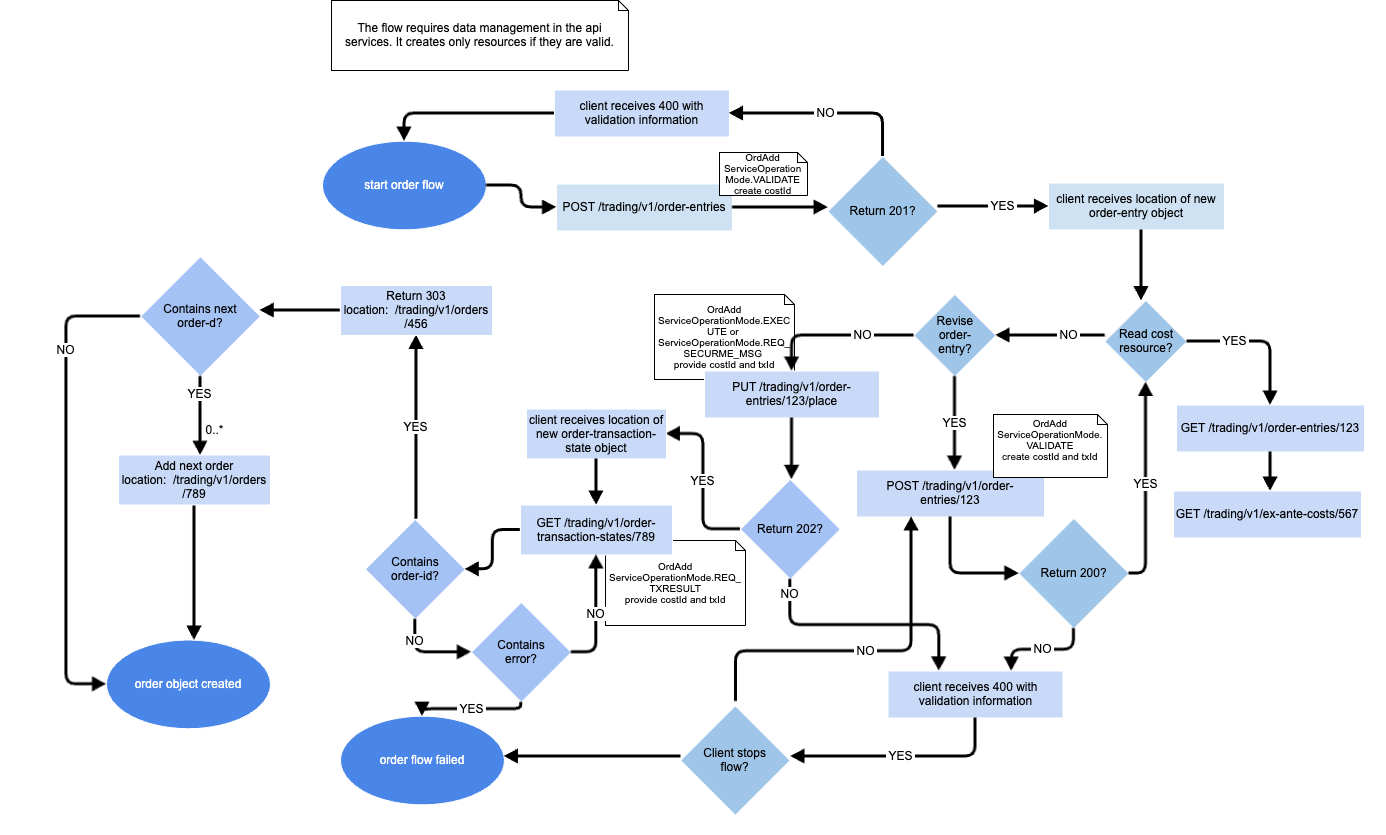
- Place a next order, which is a base order with one or more additional orders, at a trading venue
Flow to place an order at a trading venue
Flow to accept a quote at a trading venue
Flow to change an order at a trading venue
Flow to cancel an order at a trading venue
Flow to create a next order at a trading venue
Savings Plans flows
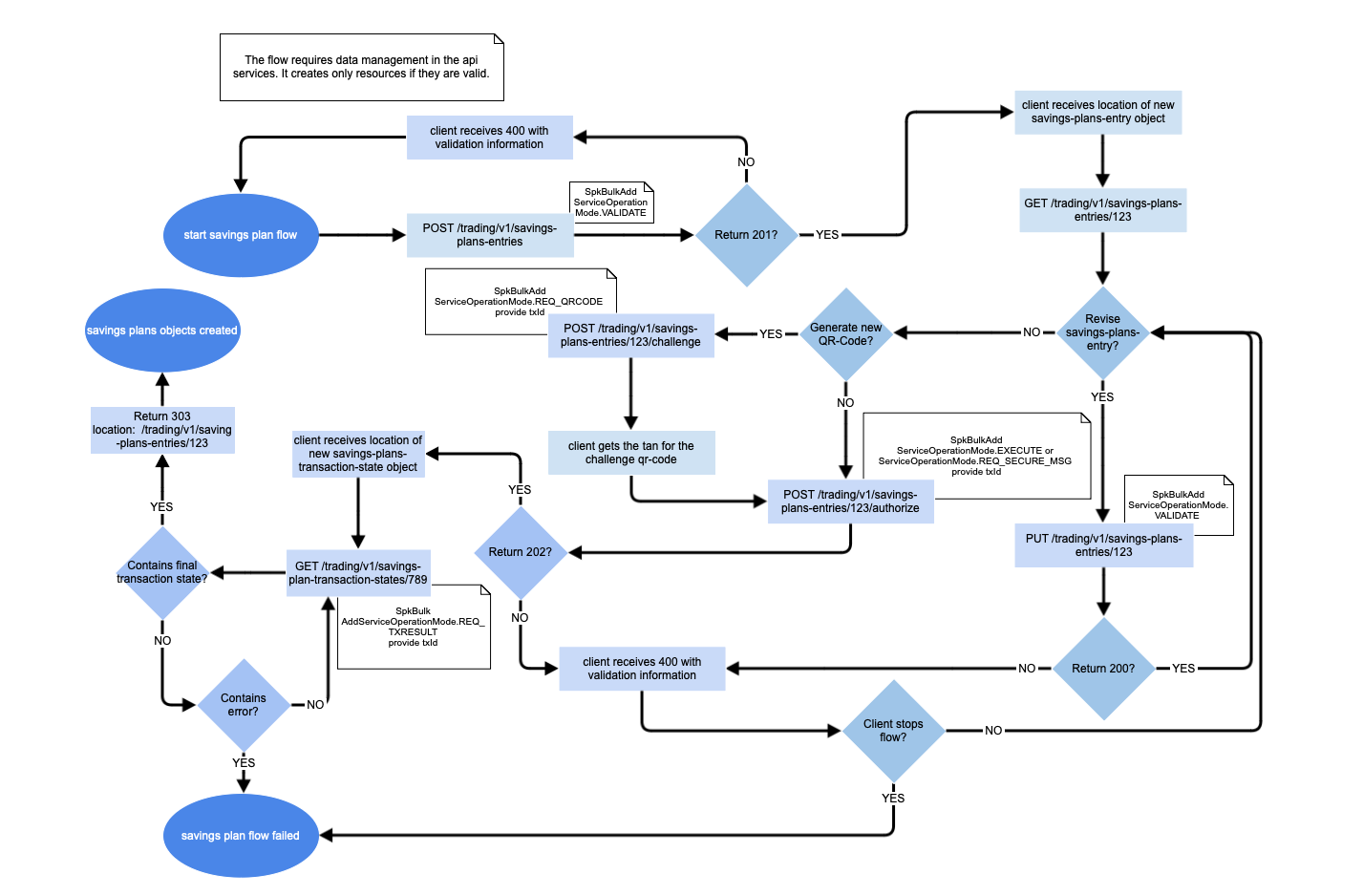
- Create a savings plan
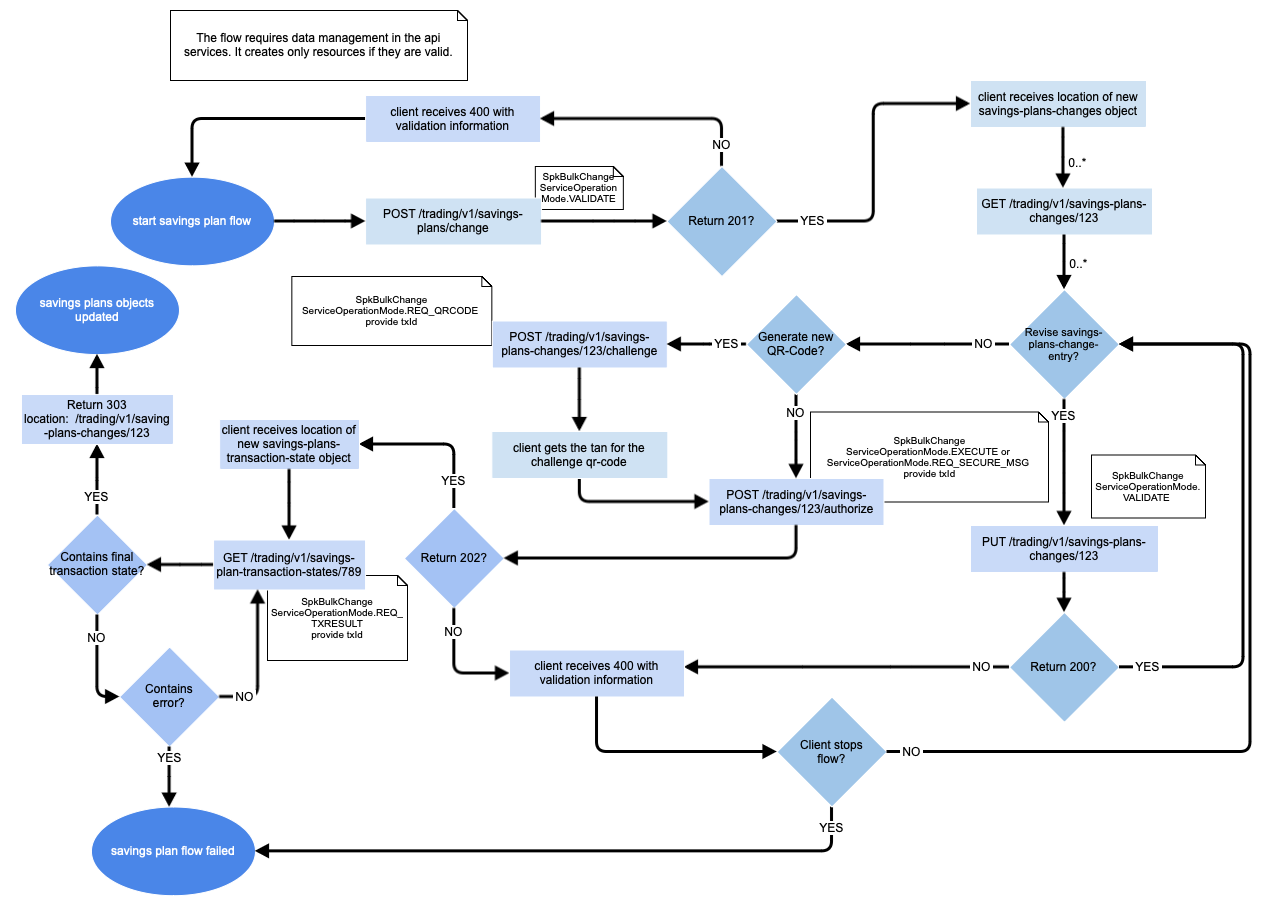
- Update a savings plan
- Cancel a savings plan
- Create an one time payment for a savings plan
Flow to create a savings plan
Flow to update a savings plan
Flow to delete a savings plan
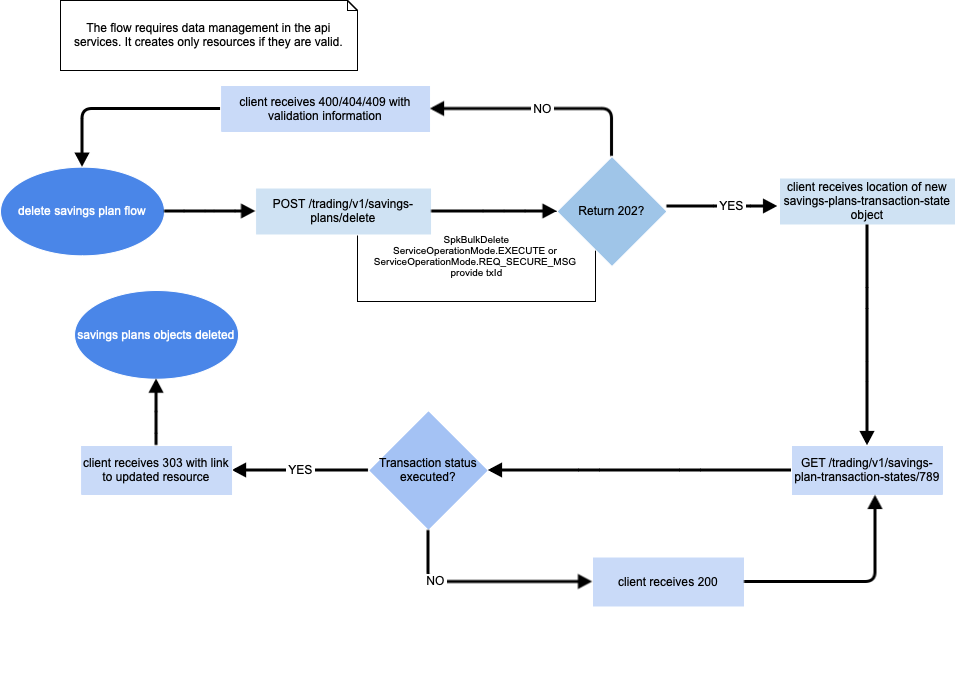
Flow to create an one time payment
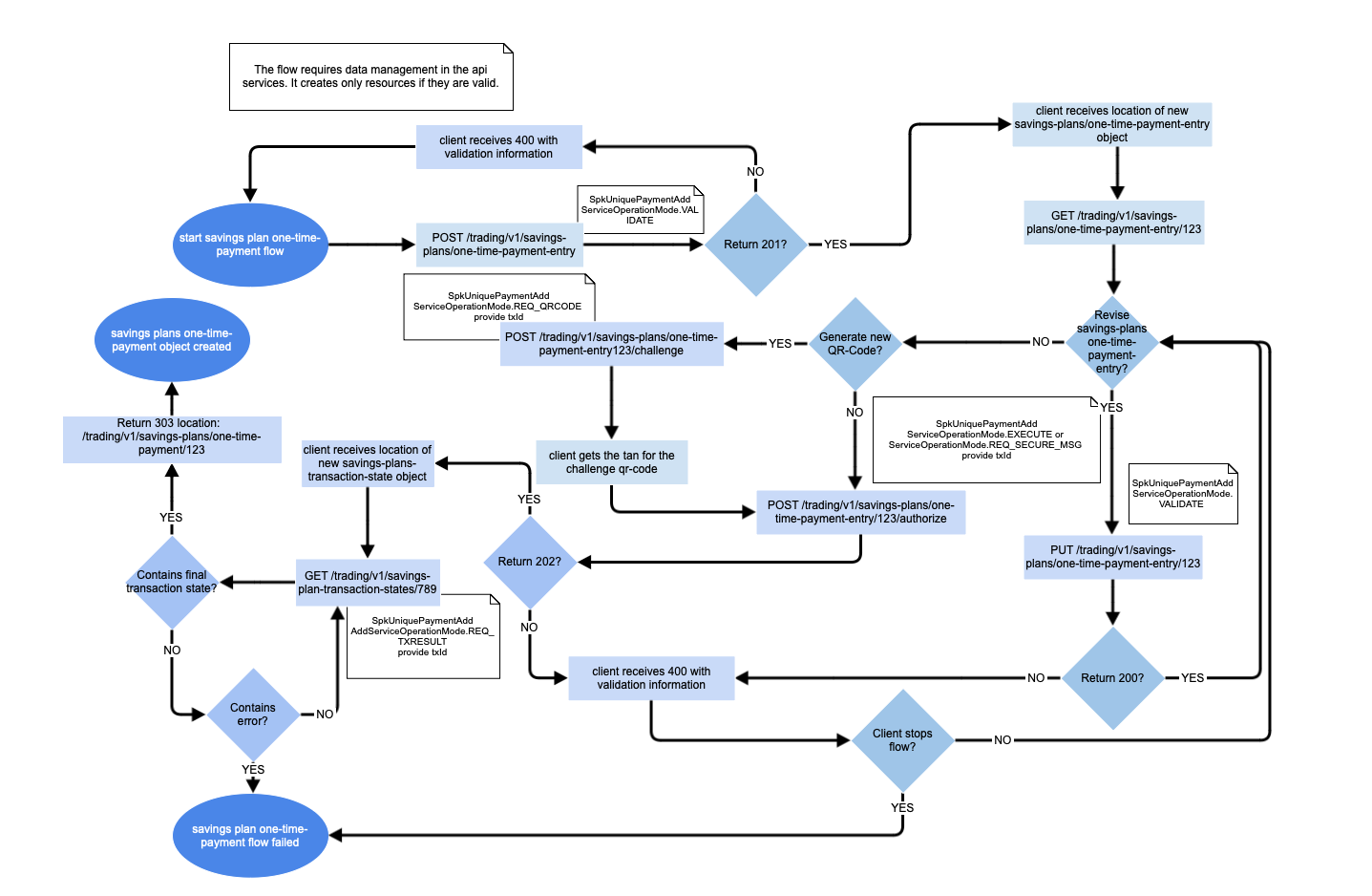
Flow to update a savings plan
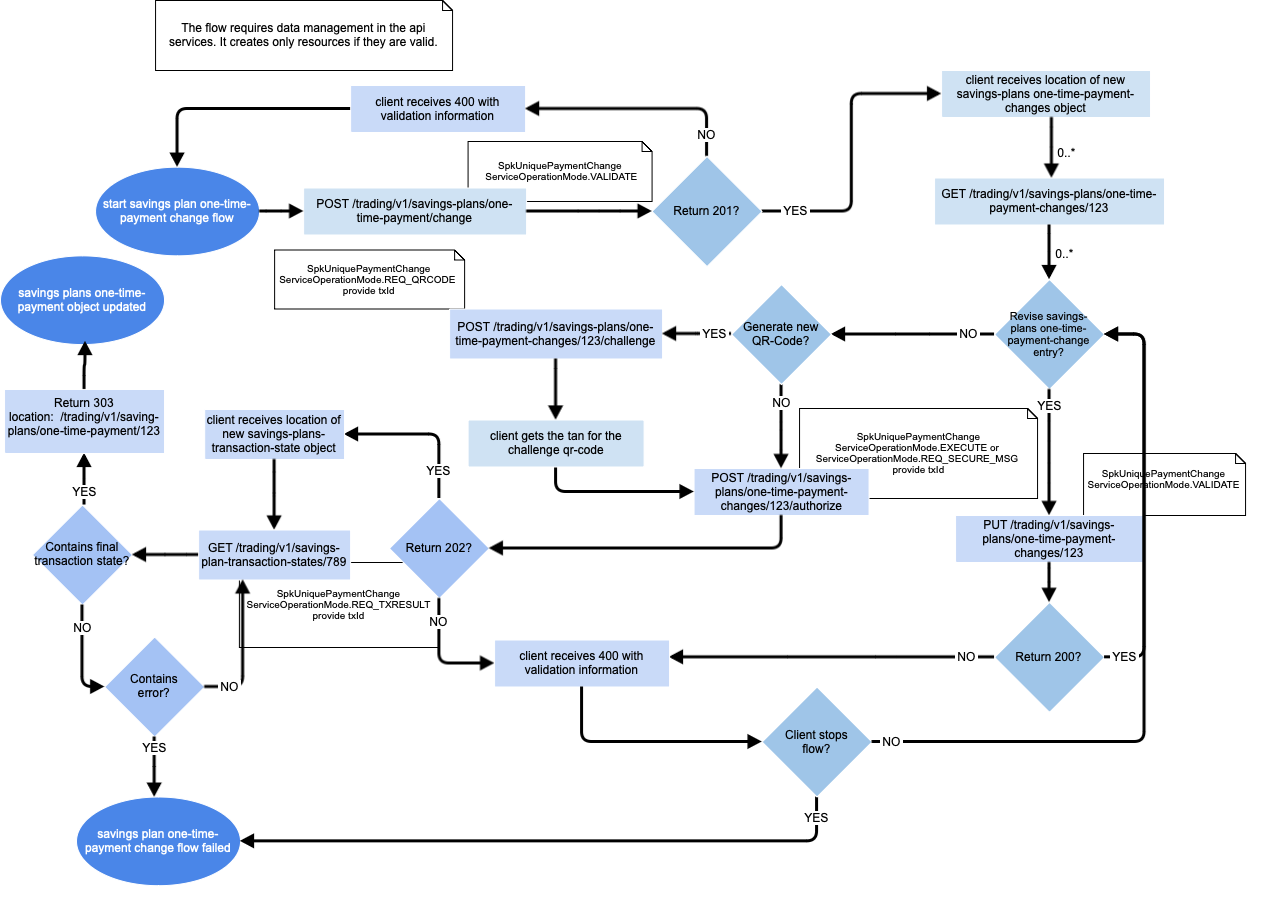
Flow to delete a savings plan
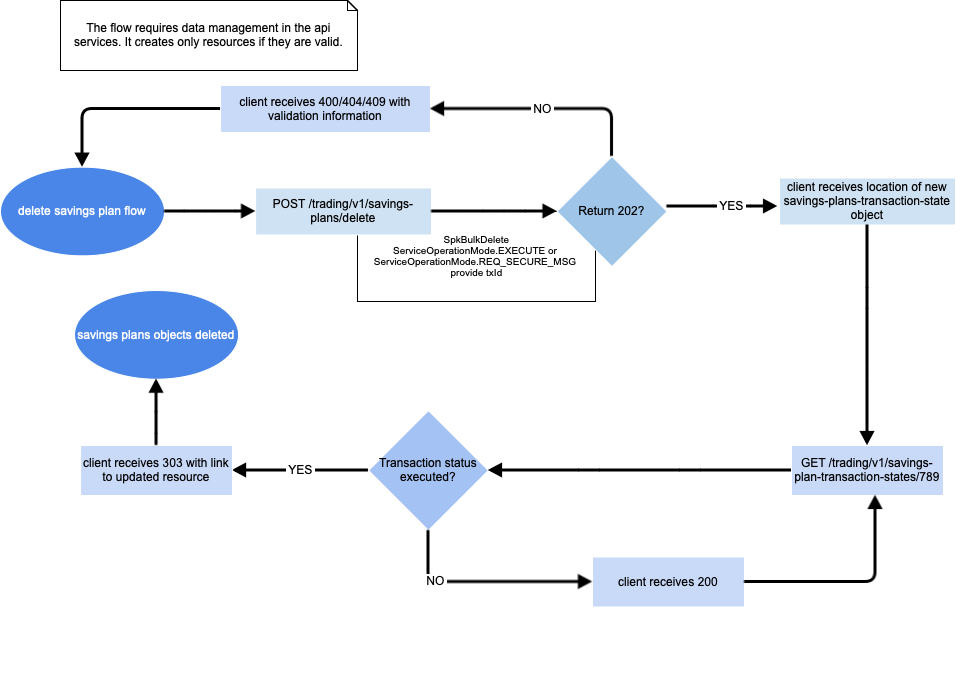
Usage rules for complex input parameters
The trading API accepts orders based on a complex order model.
POST and PUT /order-entries
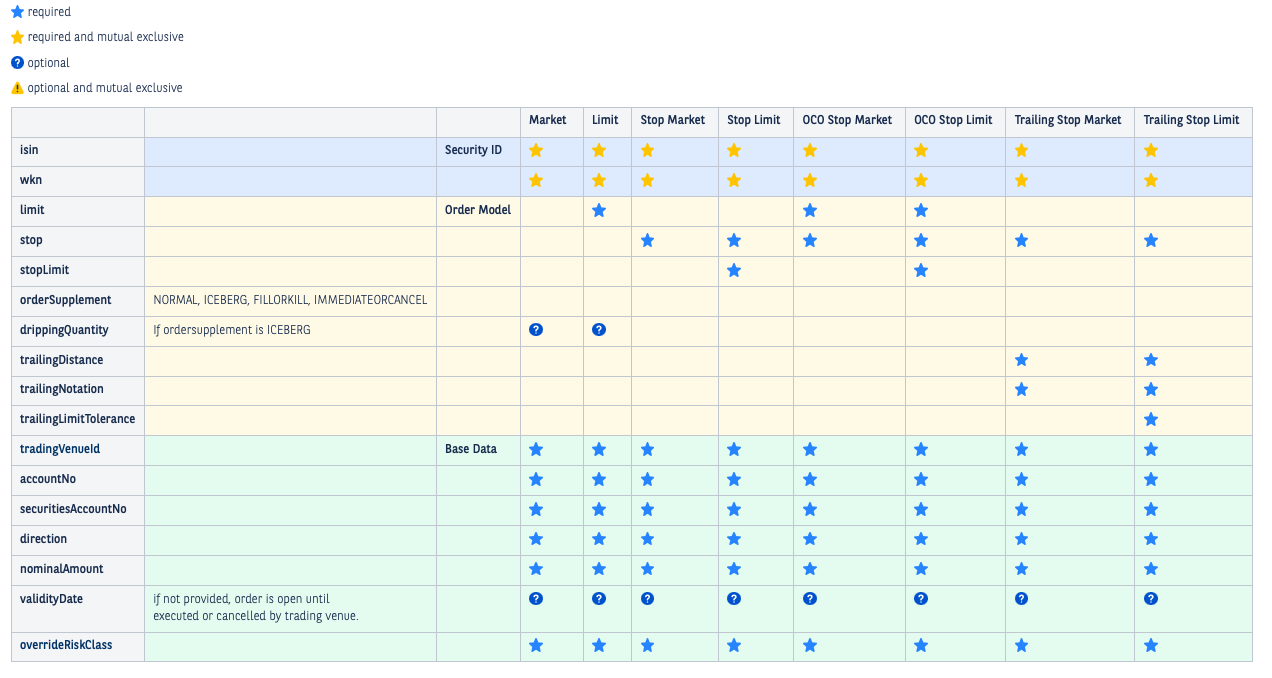
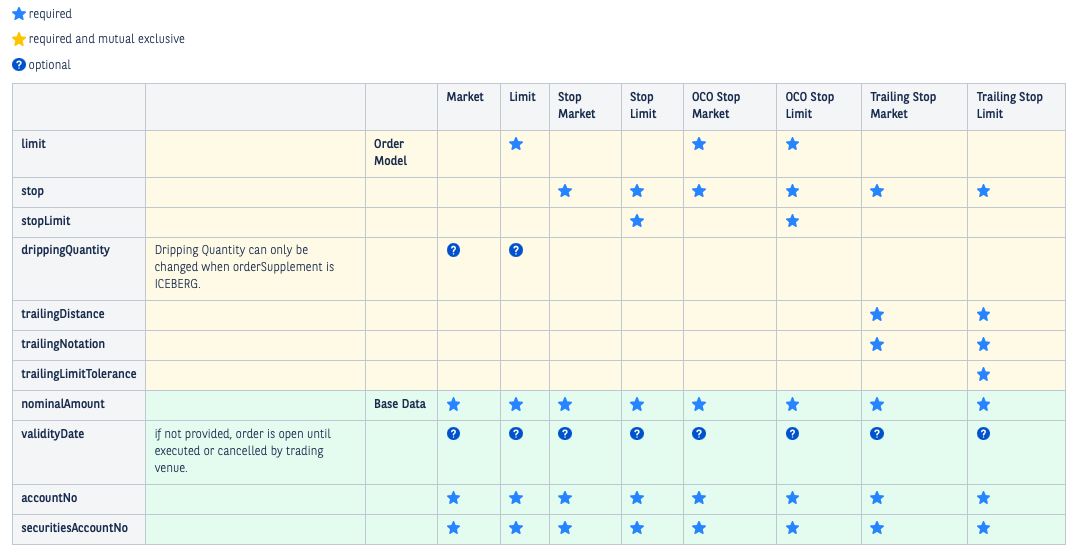
Parameter matrix
The table below shows which types of orders can be created using specific parameters.
If you want to create a market order, you can seen in the table that under the "market" entry, to create a valid order you need the following parameters in the request: the "isin" or "wkn", and the tradinVenueId, which is the place where you want to execute the trade, the accountNo, securitiesAccountNo, direction meaning whether BUY or SELL, nominalAmount indicating the amount traded and overrideRiskClass.
Compared to a market order, in the request a limit order has the additional field of "limit" added, which sets a limit of price of the security traded.
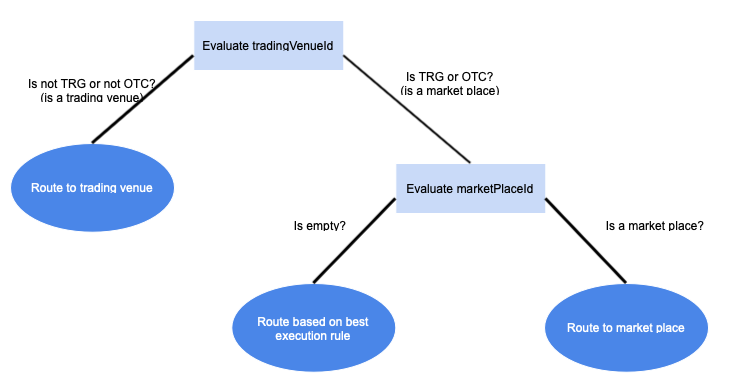
Types of Rules for tradingVenueId and marketPlaceId
Securities can be traded at tradingvenues or over-the-counter. Both parameters influence the routing of an order and can be retrieved from TradingVenue.
The following rule applies for /order-entries (limit trading at a trading venue).
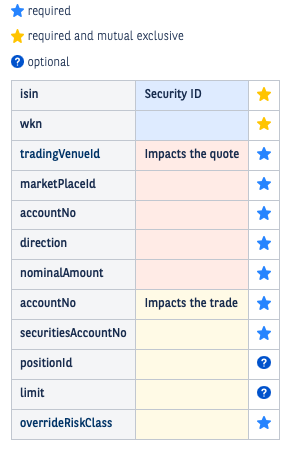
POST and PUT /quote-order-entries
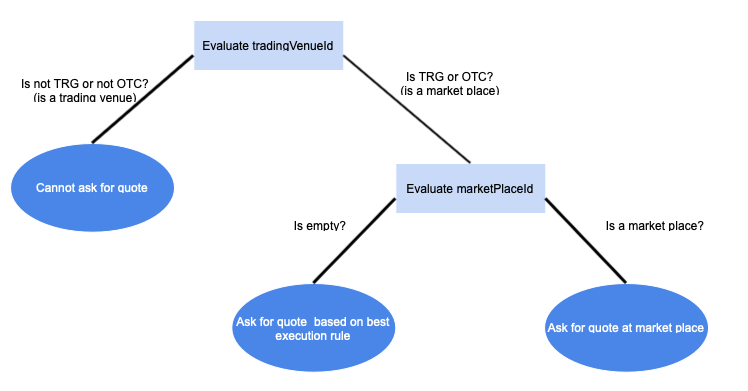
Securities can be traded at tradingvenues or over-the-counter. Both parameters influence the routing of an order and can be retrieved from TradingVenue.
The following rule applies for /quote-order-entries (quote based trading at a marketPlace).
POST /orders{no}/changes and PUT /order-changes
Parameter matrix
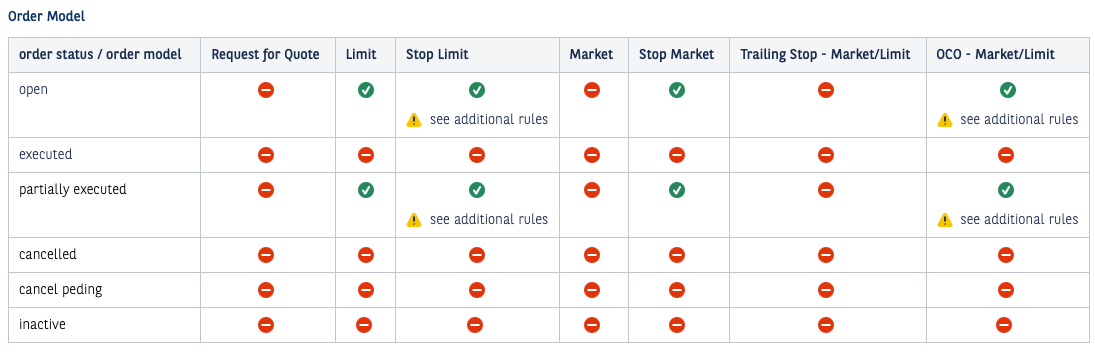
Types of orders that can be changed
GET /orders
Request parameters details
GET /orders returns all orders as a response. The response can be filtered by the following parameters:
{wkn, isin, tradingVenueId, maxRecords, orderType, orderDateFrom, orderDateTo, orderStatus, includeExecutions}
For now, the orderType filter does not function. This is expected to be fixed in the future.
The filter parameter "orderStatus" has the following filtering options:
- OPEN will filter by all open orders.
- EXECUTED will filter by all executed orders.
- ALL returns all orders.
- ACTIVE returns all active orders.
- INACTIVE returns all inactive orders.